

Hardening guide
Operate Fidwyn the way a regulated environment expects: fully air-gapped, TLS everywhere, every event forwarded to your SIEM, and backups you control.
- A completed base setup (Get started + Administration).
- Your own CA for console and broker TLS.
- A SIEM endpoint that accepts CEF, JSON or Syslog over TCP or UDP.
- A backup target you control, with a retention policy.
1 · Deploy air-gapped 
Fidwyn functions completely with no internet connection, including Augur's AI, because the model runs on your GPU and endpoint validation forbids public addresses. Onboard assets, vault and rotate, record sessions, score risk, and run playbooks entirely inside the perimeter. Model and product updates are applied from media (offline license and offline model push), not from a network fetch, so the appliance never needs an outbound route.
2 · Configure TLS 
First-boot generates per-appliance certificates so the console is reachable immediately. For production, replace them under System Settings → Server Settings with certificates from your own CA for the web console and the session broker, and require TLS on the SIEM and directory connections too. Nothing about Fidwyn depends on a public certificate authority; see Get started → server certificate for the first install.
3 · Forward to your SIEM 
Forward the immutable audit trail as CEF, JSON, or Syslog over TCP or UDP, with optional TLS, a batch size and interval, and content filters for admin actions, authentication, connection, and user-activity events. Send a test event and confirm it lands in your SIEM before you depend on the pipeline.
# representative SIEM forwarder settings
format: CEF
transport: TCP+TLS
events: admin_action, auth, connection, user_activity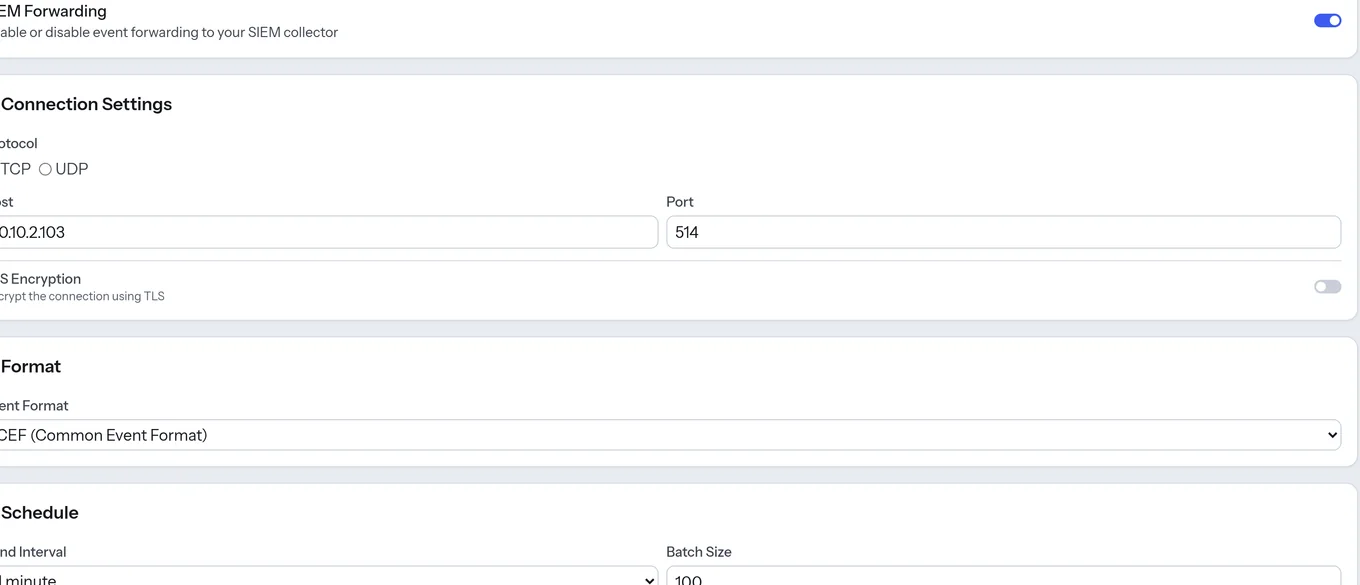
4 · Set backup targets (Backup & Restore) 
Under System Settings → Backup & Restore, schedule backups to a target you control, with a retention policy, optionally including session recordings. Test a restore before you need one: restores are validated against the running version, so plan them against the published product lifecycle. In a cluster, back up from the primary, since the credential store and audit trail are already replicated across nodes.